UI/UX Case Study
OKAYVELO

Okayvelo is a mobile e-commerce experience designed for riders who want to browse, compare, and buy bikes with confidence.
SCROLL
Problem Statement
Design an e-commerce flow that enables confident bike comparison, improves checkout completion, and increases trust at the point of purchase.
Proposed Solution
okayvelo introduces a side-by-side bike comparison and a guest checkout with visible security cues, helping riders make confident decisions and reducing cart abandonment
Goal
Create a streamlined, all-in-one solution that supports both planning and on-trail safety.
Role
Sole UX/UI Designer — responsible for research, ideation, wireframing, prototyping, visual design, and usability testing.
Tools
Figma, Miro, Canva, Google Docs, Zoom
I started by reviewing competitor sites and industry best practices to understand why users drop off during browsing and checkout. My methods included secondary research, competitor walkthroughs, and synthesis exercises.
Research Methods
Secondary Research – Reviewed e-commerce UX reports and articles (Baymard Institute, NNGroup, Chargebee, etc.) to understand common causes of cart abandonment and what best practices improve conversion.
Competitive Analysis – Documented purchase flows from Trek, Amazon, and Target, noting where they supported product comparison, how they structured checkout, and which trust signals they emphasized.
Affinity Mapping – Clustered observations into clear themes: difficulty comparing specs, friction caused by mandatory accounts, and reassurance provided by visible security cues.
Empathy Mapping & Persona – Synthesized findings into an empathy map and persona representing a high-income, research-heavy rider who takes bike buying seriously but wants the process to feel simple and trustworthy. Here are the key takeaways:
Key Insights
-Users open multiple product pages but struggle to compare details.
-Forcing account creation is a major barrier at checkout.
-Trust signals (lock icons, payment logos, delivery info) reassure buyers making expensive purchases.
-Shoppers prefer simple, scannable product info when narrowing choices.
Affinity Map + HMW
To synthesize my research, I created an affinity map to cluster pain points and behaviors into themes. From these clusters, I generated “How Might We” questions that reframed the problems as design opportunities, guiding the features I prioritized in the next stage.
Comparison Confusion
HMW make comparing products effortless and intuitive?
Checkout Friction
HMW create a frictionless, one-minute checkout?
Overwhelming Choices & Navigation
HMW guide users to the right product without overwhelming them?
Trust Builders
HMW proactively build trust at every touchpoint?
Comparison Confusion
HMW create a mobile experience that’s better than desktop?
Empathy Map
I created an empathy map to capture what riders think, feel, say, and do when shopping for a bike online. This helped me center the design around user frustrations—like difficulty comparing specs—and their goals, such as wanting a smooth, trustworthy checkout.
Pains
“Sometimes the trail markers aren’t even there when you need them.”
“How will I navigate if I lose signal?”
“The last thing I want is to feel stuck without a way out.”
Frustration with insufficient trail info or poor conditions.
Stress when encountering unexpected challenges, like poorly marked trails.
Gains
Clear trail details and GPS tracking reduce uncertainty.
Offline maps and retrace features ensure hikers don’t feel stranded.
Safety tools like SOS and check-ins provide peace of mind.
Reliable trail data and reviews help hikers prepare with confidence.
Gear reminders and preparation checklists reduce anxiety and build readiness.
Primary Persona
From my research and empathy mapping, I developed a primary persona: a serious rider who invests time and money in the right bike. This persona guided design decisions by keeping the focus on clarity, confidence, and reducing friction in the shopping flow.

Alex is an experienced cyclist who regularly rides and invests in high-quality gear. He carefully researches bikes before purchasing and values a clear, informative online shopping experience that helps him confidently choose the right ride.
Motivations
Wants confidence in choosing the right high-ticket product.
Enjoys exploring gear innovations and staying current with bike tech.
Values efficiency and clarity when shopping online.
Looks for trust signals to justify large investments.
Needs
Clear product comparison tools to evaluate specs side-by-side.
Fast, frictionless checkout with a guest option.
Mobile-friendly flows with large CTAs and autofill for forms.
Trust signals (warranties, reviews, security badges) at every stage.
Paint Points
Overwhelmed by too many options without clear guidance.
Forced account creation leading to cart abandonment.
Confusing product navigation (e.g., subcategories, cluttered listings).
Distrust when policies, warranties, or reviews are unclear.
Frustration with broken or inconsistent mobile checkout flows.
Guided by research insights and my primary persona, I explored ways to make bike shopping simpler and more intuitive. Early sketches focused on clear navigation, a two-bike comparison mechanic, and a checkout flow that reduced friction.
Lo-Fi Wireframe
To translate my research into a functional experience, I created low-fidelity wireframes that mapped the complete purchasing journey—from browing bikes to checkout. There wireframes allowed me to rapidly test page layouts, product comparison, navigation, and checkout flow before investing time in high-fidelity designs.
HOME

PRODUCTS

DETAIL

COMPARE
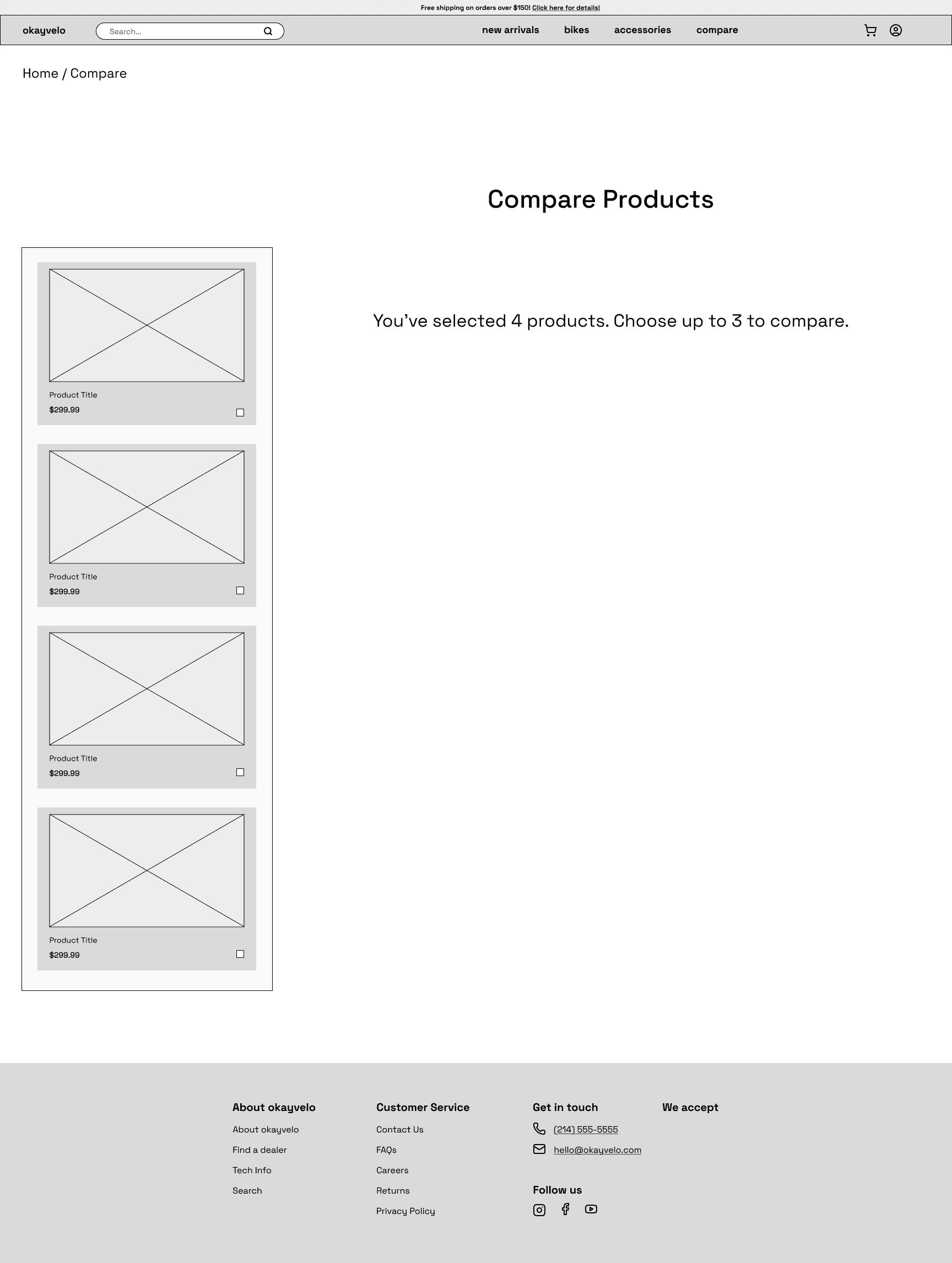
COMPARE

CART

CHECKOUT

CONFIRM

Typography & Colors
I chose Space Grotesk for its clean geometry and high readability. It gives the interface a modern, utilitarian tone that fits Okayvelo’s identity—technical yet approachable.
The palette is monochromatic, built from black, white, and variations of blue (#0055FF). Gradients of the same hue add subtle dimension while keeping the look focused and cohesive.
I conducted two rounds of usability testing to validate the browsing, compare, and checkout flows. Feedback from the first round guided targeted refinements that improved clarity, reduced friction, and strengthened user confidence throughout the experience.
First Prototype & Usability Testing: Round 1 Findings
-Some users were confused after adding bikes to compare and expected them to appear automatically.
-The spec table in Compare felt dense and hard to scan.
-A few participants overlooked existing trust cues and wanted clearer reassurance earlier in checkout.
-Minor requests for more detailed delivery information after purchase.
Changes After Round 1
Change #1
BEFORE

AFTER

Reworked the End Hike flow with a clearer CTA.
Change #2
BEFORE
AFTER
Reworked the End Hike flow with a clearer CTA.
Second Prototype & Usability Testing
After incorporating the first round of feedback, I refined the prototype to simplify the compare flow, reinforce existing trust cues, and polish the overall browsing and checkout experience. The updated design was tested again with five participants to validate improvements and identify any remaining issues.
Round 2 Findings
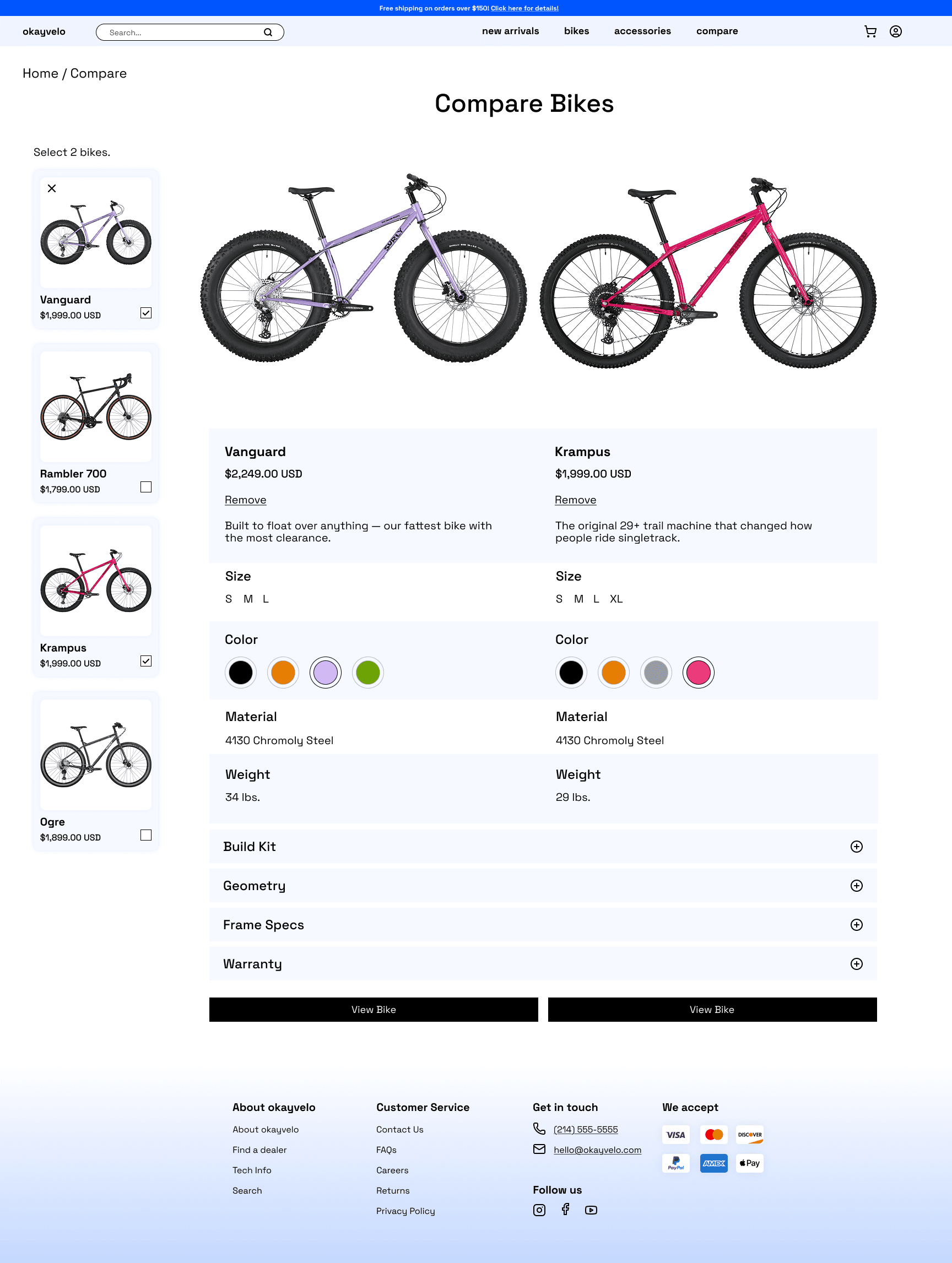
-The new two-bike compare feature worked smoothly and eliminated previous confusion.
-Participants liked the simplicity of the table but still skimmed through some specs too quickly.
-All users completed guest checkout without help; trust cues were noticed earlier and felt reassuring.
-Upsells were visible but still drew limited interaction.
-One participant wanted more detail about delivery timing on the confirmation page.
Outcome
The final Okayvelo prototype delivers a cleaner, more intuitive shopping experience that supports users from browsing to purchase. Limiting the compare feature to two bikes clarified decision-making, while visible trust cues and a guest checkout flow reduced friction and boosted confidence. The result is a design that feels simple, reliable, and built for riders who take their choices seriously.




Key Outcomes
Simplified bike comparison with a two-bike limit and clearer layout.
Stronger sense of trust and security during checkout.
Reduced friction through guest checkout and better visual hierarchy.
Improved overall flow consistency from browsing to confirmation.
User Validation
Participants in the second round of testing confirmed that the new design felt smoother, more intuitive, and trustworthy. The compare feature worked as expected, and visible security cues made checkout feel safe. Users said they’d feel confident completing a purchase on Okayvelo.
This project taught me how small UX decisions can have a big impact on user trust and clarity.
Throughout Okayvelo, I learned the value of refining—not reinventing—core e-commerce patterns. Simplifying the compare mechanic and emphasizing existing trust cues showed me how perception can matter as much as functionality. I also gained experience balancing business goals like conversion with user needs for confidence and simplicity. If I had more time, I’d explore responsive versions and deeper personalization, but the outcome demonstrates how thoughtful adjustments can make complex shopping experiences feel effortless.


back to top